
Change Banking Details SASSA
Changing your bank account for the SASSA grant isn’t complicated, but it needs to be done right. You can update or add new banking information to receive your grant money in the correct account every month. If you have closed an old account, opened a new one, or just need to update your payment method, you can submit your bank details to SASSA to register your personal account for your grant payout.
Requirements for SASSA Banking Details
Your active bank account is required to receive SASSA grant payments. The account must be in your own name and match the name on your ID.
The phone number you used for your SASSA online application is required for verification and to receive the secure link needed to update your banking details.
If you changed your phone number, update it through the SASSA portal before changing your banking details so you can receive the secure link needed to update your account online.
Change Banking Details SASSA
Through the SASSA online portal, changing your payment method is easier than visiting your regional office in person. You can update your banking details once a month and avoid frequent changes, which can delay your grant. Follow the steps below to complete this process.
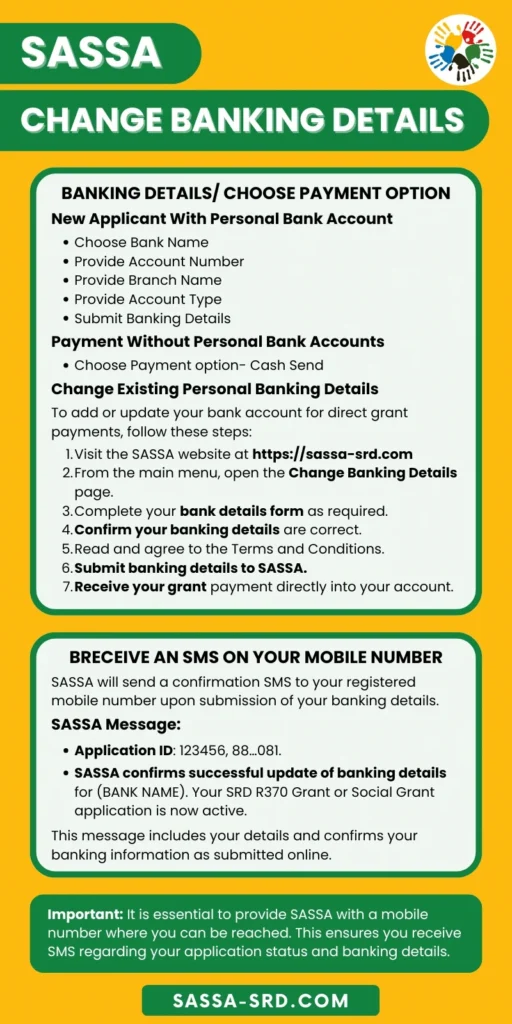
Step 1 – Visit the Official SASSA SRD Website
Go to the SASSA portal (https://srd.sassa.gov.za) using any browser on your phone or computer.
Select your ID type. Choose “South African ID Holder” if you have a South African Smart ID, or Asylum Permit if you have a Refugee ID document.
Scroll down the page until you see the option “How do I change my banking details?” Click on it to start the process.
Step 2 – Enter Your Identification Details
Input your 13-digit South African ID number exactly as it appears on your ID document. Then enter the cellphone number you registered during your SASSA application. Click “Submit” to request verification.
Step 3 – Verify Your Identity with OTP
You’ll receive a six-digit One-Time PIN via SMS within a few minutes. Enter the OTP you’ll receive from SASSA in the verification field on the screen and click “Verify Pin” to confirm your identity.
The SMS is only valid for 15 minutes, so enter it as soon as you receive it. If you wait too long, you’ll need to start over.
Step 4 – Access Secure Banking Details Link
After verification, you’ll receive a second SMS with a unique secure link from SASSA. Click this link to open the banking details page. This link expires after you use it, so don’t share it with anyone and use it right away.
Follow the on-screen instructions carefully from this point forward.
Step 5 – Submit New Banking Information
To register your personal bank account, you need to select the bank payment option and then choose your bank’s name from the dropdown menu.
SASSA accepts all South African banks, including TymeBank, Capitec, FNB, ABSA, Investec Bank, Nedbank, Standard Bank, African Bank, Bidvest Bank, Ubank, Grindrod Bank, and Postbank.
You have to add your banking information. Start by entering your account number in the given field. Double-check this for accuracy because one wrong digit will cause transaction failures.
Provide your branch name or code, then select your account type (Savings or Cheque/Current).
Agree to the Terms and Conditions, then click “Submit Updated Banking Details” to SASSA.
If you don’t have a Bank Account, you can use the other payment option to receive your SASSA grant money.
Click to select the ‘SASSA Card’ option instead of entering bank details. You can also choose your payment collection point from the options that include Pick n Pay, Shoprite, Boxer, Checkers, Usave, and Spar.
You will be asked to confirm your registered phone number, then submit your preference. Now you’ll receive an SMS with a withdrawal code when the grant is approved for each month.
Once you have successfully submitted your banking information online, you need to wait for SASSA’s verification and validation approval.
Change Banking Details at SASSA Office
You can go to your nearest SASSA office in person to change your banking details. This option is recommended if you are experiencing online system errors or technical issues, as staff can help resolve the problem directly.
To visit the SASSA regional office, you are required to bring your original South African ID and your new bank account details. The required information includes:
- Bank name
- Bank account number
- Account type
- Bank branch code
When visiting the office, it is best to arrive early in the morning (around 8:30 AM) to avoid long queues, as midday is usually the busiest time.
At reception, request a banking details change form. Complete the form, and ask a SASSA official for help if you are unsure about any section.
You can submit the form along with your original ID for verification, and make sure to receive a receipt as proof that your payment method has been updated to your provided bank account.
After submission, your banking details are sent for verification and validation as soon as your request is recorded on the SASSA system.
Once your banking details are updated successfully, you can check SASSA payment dates. This schedule is updated monthly to remind you to check your bank app on the exact paydays to confirm you get paid for each month.
SASSA Banking Details Verification and Validation Process
After submission, SASSA verifies your banking details directly with your bank to confirm that the account is active and registered in your name. This verification usually takes one week to 10 working days. Whether you apply online or visit a SASSA office, the waiting time is the same.
During processing, your banking details are sent to the National Treasury and then forwarded to your selected bank for verification. The bank confirms account ownership and checks that the account is active. The results are sent back to Treasury and then returned to SASSA. Once updated, SASSA schedules your grant to the new account.
You will receive an SMS confirmation once verification is complete. If you do not receive confirmation after ten working days, contact SASSA on the toll-free helpline 0800 60 10 11. Avoid changing your banking details multiple times, as it goes to re-verification, which causes unnecessary delays.
Restrictions for Changing SASSA Banking Details
SASSA advises beneficiaries to update their banking details before the 19th of each month. After submission, banking details can only be changed in the next month.
Changing your banking information late or multiple times will delay your grant. Please avoid switching bank accounts unless necessary.
After updating your banking details, the change applies only to future payments. If you change your account today, it will take effect for the next month once SASSA completes its verification process. Any grant already in process or approved will still be paid into your old bank account.
Fix Common Banking Detail Issues
These are some of the most common banking detail errors you may face, and the steps you can take to correct them and avoid bank payment issues.
Banking Details Pending
This status means that SASSA does not have valid banking information for your grant payout. The previous details are incorrect or incomplete. As a result, your grant is on hold until valid information is submitted.
To resolve this, you must submit the correct banking details immediately via the SASSA online portal. If you do not update your details in time, SASSA can pay your grant to an alternative payment method, such as the South African Post Office (SAPO). You would then need to collect your grant in person from your local Post Office or an approved retailer.
Bank Verification Failed
Your bank account verification failed for several reasons.
- You may have entered an incorrect bank account number, or there may be a typo in your details.
- A wrong bank name or branch code also causes failures.
If the account isn’t in your name, verification will fail. SASSA only accepts accounts registered to the beneficiary and does not verify accounts belonging to other persons, shared accounts, or joint accounts.
- Name mismatches between your ID and bank records are another common cause.
- Closed or inactive accounts will not pass verification.
To resolve these errors, you need to call your bank to confirm your account details are correct, your account is active, and that your name matches your ID as the account holder. If the name on your bank account differs in spelling from your ID, you must contact your bank to correct it.
If you have legally changed your name due to marriage or divorce, you need to update your personal information on the SASSA portal. Then re-submit your corrected details, ensure you select the correct bank from the dropdown menu, enter the accurate branch information, and account number against your bank statement to prevent any future verification failures.
Identity Verification Failed
This means your personal details do not match the SASSA database. Common causes include missing an identity number, incorrect 13-digit ID format with spaces or dashes, or an ID flagged for fraudulent activity.
To resolve this, you must complete biometric verification in person at your local SASSA office. This confirms that your ID document matches the details submitted to SASSA, which fixes the verification issue.
Phone Number Not Linked to Your Grant
You must use the cellphone number you registered during your grant application. SASSA accepts only the registered number linked to your grant. If you use a phone number that is not linked to your application, SASSA will not accept your request to update the payment method.
If you no longer have your registered number, you have to update your contact information on the SASSA portal with a new number. To do this, you can complete the SASSA change phone number process online or at a SASSA office before attempting to correct your banking details.
Can I Change My SASSA Banking Details Before My Grant Is Approved?
SASSA cannot allow changes to banking details for unapproved applications because the system requires an active grant reference number. You must wait until your application result is announced, which you can do using the SASSA status check online. Once your application is approved, you can use the “Change Banking Details” option to add your new bank account. This process is done online, and once your details are verified, your grant will be paid directly into your personal bank account.
Can I Receive My SASSA Grant Without A Bank Account?
SASSA pays grants not only into bank accounts but also through the Post Office, retail shops, and the SASSA card (Postbank card). You can update your payment method online or by visiting your nearest regional office with your ID document.
- Cash Send at Retailers: You can collect your grant as cash at participating retailers like Pick n Pay, Boxer, and Shoprite using your registered phone number and ID.
- Post Office Collection: You can pick up your grant in cash at any South African Post Office (SAPO) branch using your ID card.
- Postbank Card: You can apply for a Postbank card (Black card). This is free and works like a debit card, but is only used for SASSA grants.
Contact SASSA for Banking Details
Call SASSA on 0800 60 10 11 to reach the national helpline. The helpline is free anywhere in South Africa. You can also contact SASSA WhatsApp at +27 82 046 8553 for quick queries and support.
- For enquiries, email grantenquiries@sassa.gov.za
- For SRD grant specific enquiries, email srd@sassa.gov.za
Update new banking details
Hello, Rooksana only members can update their personal information.
Let’s continue with updating my banking details
I lost the number that i apply with how can I change it
You can update your Phone Number here https://sassa-srd.com/sassa-change-phone-number/