SASSA R370 Application
SASSA R370 Social Relief of Distress (SRD) Grant is common in South Africa, with an estimated 9 million beneficiaries and around 80,000 new applications submitted every month. To avoid long queues, transport hassles, and delays caused by manual processing by the office staff, you can use the SASSA portal to apply online. We have simplified the complete process below.
Requirements for SASSA SRD Application
According to the current eligibility criteria, you can apply for the R370 grant if you are over 18 years old and have a South African Smart ID Card. Recognized refugees are accepted with a refugee ID, and asylum seekers need a valid Section 22 permit.
For registration, SASSA also requires an active cellphone number, which will be used for OTP verification and to receive authorized updates.
Once you submit your application for the SRD grant, you cannot receive any other SASSA social grant or government funding, such as UIF or NSFAS. SASSA allows only one grant per individual, and if you already receive another grant, your application will be rejected.
SASSA R370 Application Process Online
The steps below show exactly how to submit your SASSA R370 application online and prevent delays or rejection.
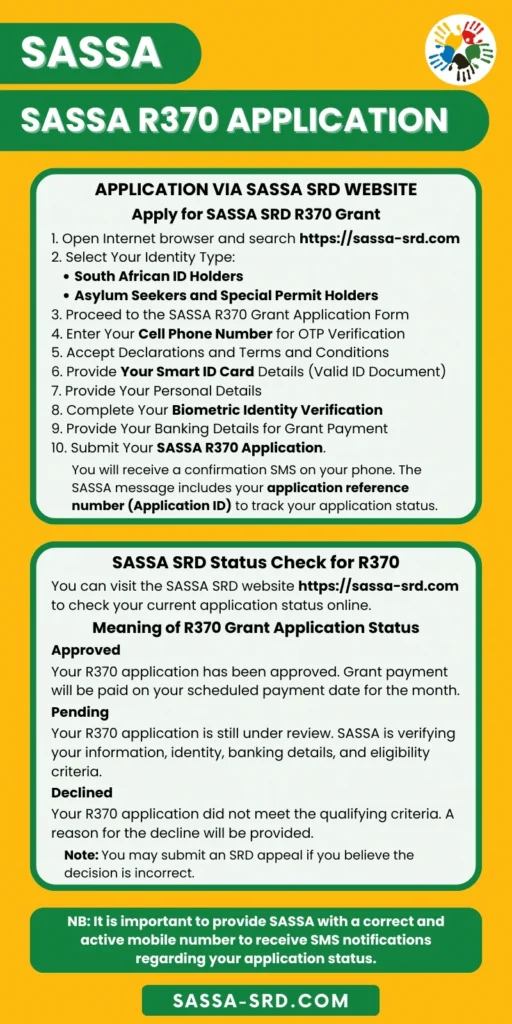
Step 1 – Visit the SASSA SRD Portal
Using the internet browser, visit the SASSA SRD portal link. https://srd.sassa.gov.za/
Step 2 – Select Your Identity Type
On the portal homepage, choose the correct IT type, either ‘South African ID Holders’ or ‘Asylum Seekers and Special Permit Holders’.
Step 3 – Proceed to the SASSA R370 Grant Application Form
On the next page, click the yellow button that says “How do I apply for this SRD Grant?” to start your R370 application.
Step 4 – Enter Your Cell Phone Number for OTP Verification
You have to provide your personal mobile phone number and click the ‘Send SMS’ button to receive a One-Time PIN. Then enter the SASSA OTP on the SRD portal to verify your number.
Step 5 – Accept Declarations and Terms and Conditions
You can read and agree to the Declaration and Consent documents, permitting SASSA to verify your data with Home Affairs, SARS, UIF, NSFAS, and banks.
Step 6 – Provide Your Smart ID Card Details (Valid ID Document)
Enter your 13-digit South African Smart ID Card number or provide your ‘File Number’ or valid permit in the given section.
Step 7 – Provide Your Personal Details
In your SRD application form, enter your full name and surname exactly as they are printed on your ID document, your gender, residential address, and your full contact information.
Step 8 – Complete Your Biometric Identity Verification
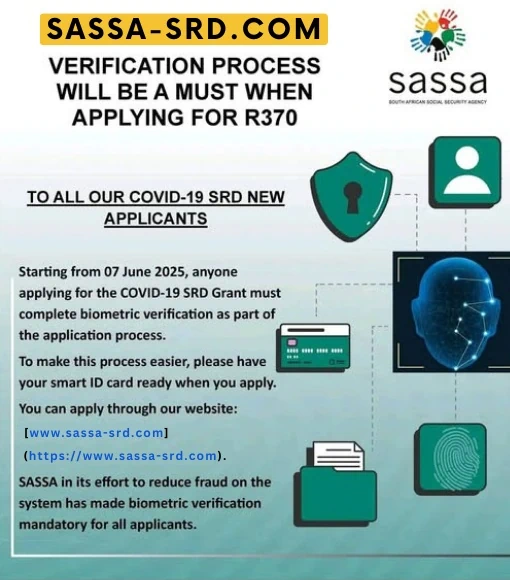
To verify your identity, SASSA will send you an SMS with a secure link on your phone. Open it and take a clear selfie to complete facial recognition verification.
This verification is part of SASSA’s electronic Know Your Customer (e-KYC) system, introduced back in 2025. Your selfie is checked against the Department of Home Affairs records to confirm your identity.
If the biometric verification fails, the system will notify you to visit the local SASSA office. An officer will then capture your fingerprints and check your ID document to verify your identity in person. This is necessary if you have an old green ID book.
Step 9 – Provide Your Banking Details for Grant Payment
If you have an active bank account, you can provide your personal banking details to receive your SRD grant payment. SASSA needs your bank name, branch, account type, and account number.
If you do not have a bank account, you can choose the SASSA Card or Send Cash as your payment option. This allows you to collect your SRD R370 grant money at the Post Office or participating retailers such as Checkers, Shoprite, Spar, Pick n Pay, and USave.
Step 10 – Submit Your SASSA R370 Application
Once you’ve completed the SRD R370 application form, submit it to SASSA for review. Before you click Submit, double-check that your details are correct, particularly your name, phone number, and banking information.
After submission, you’ll receive an SMS confirmation with your Application ID, also called the application reference number. This confirms that you’ve applied for the SASSA R370 grant online and lets you track your application status.
SASSA Processing and Approval of Your SRD Application
After you submit your SASSA online application for the SRD R370 grant, it usually takes up to 3 months to process. During this time, SASSA checks your personal details, ID, income, and banking information. They compare your information with the Department of Home Affairs, banks, SARS, UIF, NSFAS, and other government databases to confirm eligibility.
If there are fewer applicants at the time, you can expect your application to be processed faster, sometimes within about 15 days. Once a decision is made, you’ll get an SMS from SASSA on your registered cellphone informing you of your application outcome. You can then check the SASSA payment dates for that month to know when your payment is scheduled.
If you registered your bank details, you will be paid directly into your bank account, depending on how quickly your bank processes the transfer. If you chose the other payment option, you will need to collect your approved SRD grant in person from the authorized retail outlets in your area.
SASSA SRD R370 Grant Status Check
You can check your SASSA SRD status online to confirm that your SRD R370 application is approved, pending, or declined. Checking your status only takes a few steps.
- Visit the SASSA SRD website at https://srd.sassa.gov.za/
- Enter your South African ID number and the cellphone number used during application.
- View your SRD R370 application status and related details.
Your SASSA status shows the current decision on your SRD R370 application. The system is updated weekly as applications are reviewed.
To avoid missing a payment, check your SRD status before the last week of each month to confirm whether your grant has been approved for that period. Here’s what each status means.
R370 Status Pending
Your application is still under review. This usually means verification checks are ongoing, such as ID, income, or banking details. Processing can take days or weeks. If SASSA needs more information, it will be shown in your status. If your status stays pending for more than a month, contact the SASSA helpline at 0800 60 10 11.
R370 Approved
Your application has passed all checks and is approved. The status will show the approved month and the first payment date for your SRD R370 grant for that month.
R370 Declined or Rejected
One or more verification checks failed during the review process. SASSA declined status will show the reason, such as income detected, UIF registered, ID verification failed, or banking details not verified. Read the reason carefully to know what needs to be corrected in the updated application, or if you can submit a SASSA appeal.
Can You Apply Again if Your SRD R370 Application Was Declined or Lapsed?
SASSA does not restrict the reaplication. If your application was previously declined because you did not meet the requirements, and your situation has now changed, you can submit a new SRD R370 application online. There is no limit on reapplications, as every new application goes through full verification based on your current details and circumstances.
How to Remain Eligible for the SRD R370 Grant
To remain eligible for the SRD R370 Grant, you must continue meeting all qualification requirements every month. Your income must stay below the R624 threshold, based on what appears in your bank account. You cannot receive UIF or NSFAS funding and another SASSA grant, such as child support, disability, or an older persons’ grant.